We’ve audited 32 manufacturing and industrial company websites for traditional SEO (Google, Bing) and AI search visibility (ChatGPT, Claude, Perplexity, Copilot) in the past few months.
Tens of thousands of URLs crawled. Hundreds of pages scored by hand based on their content. Hundreds of AI search visibility issues uncovered.
We boiled everything we learned and saw down to a checklist of the nine problems we saw again and again.
For each website issue, we’ll give you:
- A plain-English description of the problem
- Real, anonymized examples of the many different ways it showed up for manufacturers
- How to check if it’s an issue on your website
- How, exactly, to fix it
Let’s dive in.
Checklist item 1: Are you missing the questions buyers ask before they know your name?
As part of every audit, we draw on sales calls, deep discovery and customer research to map the words buyers use when they search for what you sell. Then we track 12 to 50 questions your buyers ask in ChatGPT, Gemini, Perplexity and Google’s AI Overviews.
We take note of where you appear, and we take note of where you’re missing. And, when you’re missing — we evaluate why. What content did the competitor write to satisfy a buyer question that’s absent from your site? What industry publications are they mentioned in that you aren’t?
The answers give you a road map: the pages to write, and the reviews, bylines and press mentions to earn.
Across our audits, companies were absent time and again for at least a few queries that buyers are asking because no page on their site answered it satisfactorily. Each miss tells you what to fix: a page to write, or a publication to get into.
Anonymized examples from our audits
Select an example to open it.
No content to address common buyer queries
On the question of making a part in-house or outsourcing it, one contract manufacturer was missing from three of the four AI tools we tested. No page on its site addresses that question.
Named for “who makes this,” missing from “how do I choose”
One company appears on all eight tracked questions that ask who the suppliers are, and on none of the 16 that ask how to pick one.
No page for a market or capability you lead with
One manufacturer mentions a material its machines are built for on only four of its 126 pages — each time as a line in a list. AI tools named it in none of 139 answers about that material, while its two biggest competitors, each with a dedicated page, were recommended again and again.
Not using your buyers’ words
One company’s product phrase showed up in Google search results 1,715 times in three months, and its site used that phrase only twice. In another company’s own customer interviews, buyers describe the problem it solves in two words. Neither word appears on any of its 89 pages.
Visible on one AI tool, missing on another
One automation company appeared nine times, and every one of those appearances was on Gemini, while ChatGPT and Google’s AI Overviews left it out of all 403 answers. That’s why you have to test many questions across multiple AI platforms. Infinite surface variance means you get a different response every time you ask an AI tool something, so no single answer can tell you whether you’re consistently present or consistently absent on a topic.
How to check your site
A single prompt can’t check this one reliably. AI answers change by tool, by wording and by day, and a chatbot that just read your site will lean your way.
Use a prompt basket instead: a fixed list of the questions your buyers ask, asked the same way on every AI tool, every month.
- Write down five to 10 questions buyers ask before they know your name: who makes this, how do I choose, which option fits my application. If that feels like a lot, start with five questions on ChatGPT and Perplexity.
- Ask each one three times, each in a fresh chat, on ChatGPT, Gemini, Perplexity and Google’s AI Overview, signed out where you can.
- For each answer, note whether you were named, who was named instead and which pages were cited. Count how many of the three times you were named. If Google shows no AI Overview for a question, mark it “no overview,” not “missing.”
How to fix it
Create the most helpful content on the internet for every topic you’re absent on. You can use the content getting your competitors cited as a great place to start; you just need to make your content ten times more helpful. Also, make sure you have a page for every industry and product you sell, with specific claims (specs, tolerances, differentiators and more) smattered throughout your copy.
Our guide, “Why doesn’t my manufacturing company show up in ChatGPT answers?” explains how to build that question list and track it.
Checklist item 2: Are you being specific enough in your website copy?
When a buyer lands on one of your pages, can they tell in five seconds what it offers? Can Google and ChatGPT?
Both lean heavily on a page’s title and its opening lines to decide what it’s about.
On most of the sites we audited, the title and opening lines named the company, claimed quality and gave an AI tool little else to quote.
Sometimes, the copy was vague, so Google has to guess what to rank the page for and AI tools don’t have a clear passage to quote. Other times, we found errors in the page templates.
Anonymized examples from our audits
Select an example to open it.
Missing H1 tags
Every page needs a clear main headline, tagged as an H1, that tells Google and AI tools what the page is about. One automation company tagged the titles on its news and project pages as subheadings instead.
Page titles that lack specificity (beyond the company name)
One industrial company’s homepage title is a single word: its name. Most of its other page titles say which part of the site you’re in, not what the page offers.
Vague promises rather than real citable facts
One manufacturer’s category pages open with slogans and leave the specs for further down, past the part AI tools quote first.
The pages that sell are the thinnest on the site
One automation company’s two longest pages are its terms of service (1,525 words) and privacy policy (1,039 words). Its three service pages run 543, 111 and 83 words. Ask an AI tool what the company does, and it’ll find more to read in the disclaimers than on the service pages.
Generic copy that could describe any company
One industrial company’s six key pages averaged 8.5 of 21 on a citability rubric we use, that measures how easy a page is for an AI tool to retrieve and cite the page content, and its main industry page wasn’t retrieved for any of six buyer questions we tracked.
How to check your site
Paste this into your AI chatbot of choice with web search turned on (ChatGPT, Claude, Gemini or Copilot) and swap in your web address.
Check whether my company's pages say what they're about: [yourcompany.com]

Open everything yourself. Don't ask me to paste anything. If you can't open our homepage directly, stop and tell me what you got. Don't work from search results instead.


Check the homepage, two important product or service pages from the main menu and our most recent article (find it through the blog or news page). For each page, tell me:
1. The page title (the text in the browser tab), word for word, and whether it says what the page offers or just names the company.
2. The main headline at the top of the page, word for word, and whether it says what the page is about or just names the company or a slogan. If you can see only the page's text and not its code, say you're guessing which line is the headline.
3. The first 40 words under the headline, not counting the menu, and whether they answer a question or open with a slogan.
4. Whether the first 200 words of the page body include a number, a standard or a named customer.
5. For the article, whether it shows a date.

Then rewrite the opening sentence of each page so it says what the page offers, using only facts already on that page.
Check the code yourself: Open each page in Chrome, right-click, choose View Page Source and search for “<title” and “<h1”. The title should say what the page offers, and the H1 should be the page’s main headline. One H1 is the usual setup; zero, or more than one, is worth flagging to your web team. If View Page Source shows almost no text, use Inspect from the same menu instead, because your site builds its pages with JavaScript.
How to fix it
Give every page one main headline that says what the page offers, and a page title that says the same thing in under 60 characters. Make the first sentence under the headline answer the question a buyer came with, and put at least one number, standard or named customer in the first 200 words. Clarity before cleverness, every time.
Checklist item 3: Are you making buyers take your word for it?
Trust, but verify. That’s the attitude of AI tools making recommendations to a potential buyer.
AI tools check what you say about yourself against what everyone else says: trade press, directories, reviews and named experts.
When ChatGPT picked three competitors over one industrial company, it named its reasons: named deployments and outside recognition. Google’s own guidance on helpful content points the same way: it tells site owners to show who wrote each page and why they’re qualified.
On a few sites, we found no significant independent press coverage. On 20 of 32 sites, no expert’s name appeared on any content. On eight, the directory profiles AI tools read were unclaimed or wrong.
Anonymized examples from our audits
Select an example to open it.
Testimonials with no names
One contract manufacturer has three testimonials, all anonymous, with no named customer and no case study.
Real experts no one can see
All of the companies we talk to have some serious experts on staff. But when you go to the blog, there’s no named author for any of the content. An easy way to signal your authority to AI chatbots is to put the brains behind the content front and center as the author.
No press, awards or trade coverage
One manufacturer had zero mentions in the five trade publications that cover the market it’s growing into. In another company’s category, AI tools read an industry association’s site 104 times, named seven competitors from it — and never named the company we audited.
No reviews (or bad ones)
Asked about one company’s reputation, ChatGPT tells buyers its Google listing shows a rating under three stars from a handful of reviews. Another company’s competitor shows 4.8 stars from more than 600 reviews in the same results where the company shows none.
Competitors with more proof
One machine builder has two named customer stories. The category leader has about 90.
How to check your site
Paste this into your AI chatbot of choice with web search turned on (ChatGPT, Claude, Gemini or Copilot) and swap in your web address.
Check whether anyone outside my company vouches for us online: [yourcompany.com]
Our closest competitor: [competitor.com] (if I left this blank, tell me who you picked and why before you run any checks on them)

Use web search, and find everything yourself. Don't ask me to paste anything. Start by reading our homepage and About or Team page to learn our company name, what we make and the names of our leaders and engineers. If you can't open our homepage directly, stop and tell me what you got.

Then search for these, with a link for each:
1. Trade publications, associations or news sites that mention us, with dates.
2. Our profiles on Thomasnet and one other industrial directory. Do they look claimed (a logo, a description, current contact details), and do they list our certifications?
3. Our Google reviews: the rating, the number of reviews and where you read them. If you only saw them in a search snippet, say so. Don't count ratings from review aggregator sites as Google reviews.
4. Any public article, podcast, talk or byline by the leaders or engineers you found.
5. Any named customer or case study of ours published somewhere other than our own site.
6. On our own blog or resources pages, whether our articles name the person who wrote them.

Write "not found" for anything that doesn't seem to exist and "couldn't open" for anything you found but couldn't read. Then run the same checks on our competitor. Tell me where they have outside proof that we don't, and which gap a buyer would notice first.
How to fix it
Put your engineers’ names and credentials on what they write, and publish case studies with real numbers. Claim your directory profiles, ask customers for reviews and pitch the trade press one story a quarter.
Our AI search guide walks through how to build social proof and demonstrate authority in more detail.
Checklist item 4: Are there discrepancies across the web about your company?
Ask ChatGPT when your company was founded, where it’s headquartered and what it’s certified to do. Does it get all three right?
AI tools look in a lot of places — not just your own website — to settle basic facts about your company. Directory listings, LinkedIn and anywhere else you’re mentioned.
For many of the companies we audited, the company’s own pages had conflicting company names or founding years. And discrepancies on third-party sources just compounded the problem.
When the facts conflict, an AI tool picks one, and there’s no telling which. Stack up enough of those mismatches and one company starts to look like several:
Anonymized examples from our audits
Select an example to open it.
Outside sources still using the old name
One manufacturer had renamed itself, but every outside source we checked still used the old name and the old web address. When we asked ChatGPT about its quality certifications, it answered from the old site and cited a certificate that had expired two years earlier.
Using the wrong company name on its own site
One industrial company calls itself by four names on its own site, plus three variations for its parent company. Another company’s contact page gives one address and legal name, while its privacy policy, press releases and job postings give another.
A site that contradicts itself
One equipment maker states its product range four ways on its own site. Google, ChatGPT, Perplexity and Claude all repeated the wrong information.
Directories that disagree with your site
One manufacturer lists three different headquarters and three founding years across LinkedIn, distributor sites and directories. Another company’s directory profile shows an outdated quality certification and a quarter of the headcount on its LinkedIn page.
How to check your site
Paste this into your AI chatbot of choice with web search turned on (ChatGPT, Claude, Gemini or Copilot) and swap in your web address.
Check whether the web agrees on the basic facts about my company: [yourcompany.com]

Use web search, and open everything yourself. Don't ask me to paste anything. If you can't open our homepage directly, stop and tell me what you got. Don't work from search results for our own pages.

1. Read our homepage, About page, Contact page and footer. Note our company name (every version you see), legal name, headquarters address, founding year, certifications and any size or capacity figure.
2. Find our LinkedIn company page, our Thomasnet profile, our Google Business listing and any other directory or distributor page that lists us. Note the same facts from each. Some of these, like LinkedIn and Google's business listings, often won't open for you; say which ones you could actually read.
3. Search our company name in quotes and list any other company that uses the same or a similar name.

Build a table with one row per fact and one column per source, using the exact wording. In any empty cell, write "not found" if the source doesn't exist and "couldn't open" if it exists but you couldn't read it. Then list every fact where two sources disagree, and say which version an AI tool would most likely repeat. Finally, write one plain sentence that says who we are, what we make, for whom and where, using only facts the sources agree on. If the sources disagree on a fact, leave it out and tell me which fact you left out.

Link every source. Don't fill in anything you didn't see.
How to fix it
Pick one company name, one address and one set of facts, and use them the same way everywhere, starting with your footer, about page and quality page. Then claim your directory profiles and make them match. If you’ve changed names or web addresses, redirect the old address page by page and update every outside listing that still points to it.
Our guide, ‘Why doesn’t my manufacturing company show up in ChatGPT answers?’ covers this concept in detail.
Checklist item 5: Are you making crawlers’ job harder than it needs to be?
Google and AI chatbots like ChatGPT, Claude and Copilot use crawlers to read your website and decide what’s worth ranking and what’s worth citing.
Many of the websites we audited were turning crawlers away at the door, hurting their chances of being visible in Google and AI responses.
On seven of the 32 sites, at least one AI crawler was turned away outright.
In every audit, we fetch the site as each of the crawlers Google, Bing and the major AI tools use, to make sure nothing at the technical level is keeping the site out of search results.
Anonymized examples from our audits
Select an example to open it.
Turning away every AI crawler
When we ran the crawler test for one industrial software company, Google and Bing got in fine. But every AI crawler we tested was turned away.
Blocking some crawlers, but not all
One manufacturer’s site showed a security check to anything that wasn’t a web browser. This made it a lot harder for tools like ChatGPT, which read pages live, to read or cite its pages.
Hiding your strongest pages from search crawlers
A small file called robots.txt tells crawlers which folders they may read. One manufacturer’s file blocked more than half its site, including every spec sheet.
Critical pages hidden from search by a stray noindex tag
One equipment maker had 20 customer testimonials tagged noindex, an instruction telling search engines to ignore those pages. The site was keeping its strongest social proof out of search.
A staging site that’s live and open to search crawlers
One company left a half-built test copy of its site public. Google’s AI answer about the company cited it, placeholder text and all.
Dead links pointing nowhere
One automation company took its “technology” page down, yet AI tools still cite that dead page more than any page but the homepage. When someone clicks that link, they reach a 404 page instead of a clean redirect to the new site content. Another company still pointed dozens of internal links, including the “contact us” button on its top article, to an old web address where nothing loads.
The page says its “real” address is somewhere else
Without getting too into the weeds, a canonical tag tells a search engine which of several versions of a page is the “real” one (I talk more about why you might use a canonical tag in the “how to fix” section for this problem). One manufacturer’s canonical tags pointed to a different company’s site, which told search engines that company should get credit for its content.
How to check your site
Paste this into ChatGPT with web search turned on and swap in your web address. Use ChatGPT for this one: It opens pages live when you ask, the way it does when a buyer asks a question. One limit before you start: This tests one visitor, ChatGPT itself. A site can let ChatGPT in and still turn other AI crawlers away, so a clean result here doesn’t mean you’re in the clear.
Check whether search engines and AI tools can read my company's website: [yourcompany.com]

Open everything yourself. Don't ask me to paste anything.

1. Open the homepage directly, not a search result, and tell me exactly what came back. If you got an error, a blank page or a "checking your browser" screen, stop and tell me. That usually means a firewall is turning AI tools away. Don't carry on from search results.
2. Open /robots.txt. List any line that blocks an AI crawler by name (GPTBot, OAI-SearchBot, ChatGPT-User, ClaudeBot, Claude-SearchBot, Claude-User, PerplexityBot, Perplexity-User) or blocks product, spec, resource or download folders. Check the rules under "User-agent: *" too, since they apply to every crawler the file doesn't name. Skip lines that block search results or filter pages; those are fine.
3. Find the sitemap (it's usually listed in robots.txt, or at /sitemap.xml). Does it load? If it's a list of other sitemaps, open the one for pages. Open up to 10 of the pages it lists and tell me how many you actually opened. List any that don't load, that land on the homepage or that end up at a different address than the one listed.
4. Check the links in the main menu and footer. List any that don't load, and any that lead to another domain that looks like a copy of this site, a test site or an old company address.

Then tell me in plain English what's keeping search engines or AI tools out, worst problem first, and what to ask my web team to fix, in order. If you could read everything, say so, and say that you can't tell whether other AI crawlers get the same result.
Two checks need the page’s code, which a chatbot usually won’t show you. Open five important pages in Chrome, right-click, choose View Page Source and search for “noindex” and “canonical.” A noindex tag on a page you want buyers to find, or a canonical tag that points to a different domain, is the problem. If View Page Source shows almost no text, your site builds its pages with JavaScript: right-click and choose Inspect instead, or ask your web team.
To check the real AI crawlers, ask your web team to look at the firewall’s bot settings and the server logs for verified visits from each crawler named in the prompt.
How to fix it
Have your web team allow the AI crawlers in your firewall by name and by the IP addresses each company publishes (OpenAI, Anthropic and Perplexity each post a list), because many bot-protection settings ignore a name on its own. The crawlers that get you cited are OAI-SearchBot, ChatGPT-User, Claude-SearchBot, Claude-User, PerplexityBot and Perplexity-User; GPTBot and ClaudeBot also collect training data, so allowing those also improves your visibility. Remove any robots.txt line that blocks product, spec or resource folders. Pull noindex tags off any page you want buyers to be able to find when they search in Google and ChatGPT, and take staging copies of your site offline. Point every retired URL to the page that replaced it, not to your homepage.
Then double-check that canonical tags are applied on your site correctly. Say a tooling manufacturer sells the same carbide end mill in two categories: It’s listed under “End mills” and under “Accessories for the Model 400,” so the page exists at both /end-mills/carbide-end-mill-12mm and /model-400/accessories/carbide-end-mill-12mm. Without a canonical tag, Google and the AI tools see two competing copies of the same page, split any links and authority between them and pick whichever one they feel like citing. With a canonical tag on the accessories copy pointing at the end-mills copy, every signal flows to one address. That one ranks and gets cited, and the buyer can still reach either variation from the menu.
Our guide, “Why doesn’t my manufacturing company show up in ChatGPT answers?” walks through these concepts in more detail.
Checklist item 6: Are you hiding your specs behind a PDF or a contact form?
When a buyer asks which supplier can hold a precise tolerance, handle a certain temperature or meet a specific standard … would they find an answer on your product pages?
Better yet, does your site display that information in machine-friendly plain-text and HTML formats?
On many of the websites we audited, those specific product specs and claims existed somewhere other than the product page itself: in a PDF, a scanned file, a picture of a table or an engineer’s head.
On 12 of the 32 sites, the product pages had no measurable spec at all.
Specs in those places are harder for AI tools to find and quote. There’s a second cost. Google sometimes ranks the PDF instead of your product page, and the buyer lands on a document with no menu, no form and no way to contact you.
Anonymized examples from our audits
Select an example to open it.
Product specs trapped in a PDF
One manufacturer kept dozens of spec sheets as PDFs with no web-page version. A different industrial company’s three best reference charts rank in Google’s top three, as PDFs, with no menu, no form and no way to ask for a quote.
Specs written for people, but invisible to machines
One industrial company packs its spec sheets into zip files totaling more than 100 megabytes, and its three PDFs are scanned images. The whole site offered fewer than 200 words of specs a machine could read.
Product specs locked inside image files
One company’s competitor comparison is a table of 20 check marks, saved as an image, so a crawler reads none of it.
Specifics are missing from every page
An equipment manufacturer’s product pages listed neither a power rating nor an efficiency figure. Its closest competitor’s pages run about the same length and list six specs apiece. Another company’s “costs and lead times” page mentions no cost and no lead time.
Certifications “available on request”
One contract manufacturer held a current ISO 9001 certificate, but its quality page only said certifications were “available on request.” The three competitors we compared it against list their certifications right on the page.
How to check your site
Paste this into your AI chatbot of choice with web search turned on (ChatGPT, Claude, Gemini or Copilot) and swap in your web address.
Check whether my company's product pages give buyers real specs: [yourcompany.com]

Open everything yourself. Don't ask me to paste anything. If you can't open our homepage directly, stop and tell me what you got. Don't work from search results instead.

1. From the main menu, pick the three product or capability pages a buyer is most likely to compare us on. Tell me which ones you picked.
2. For each page, list every measurable spec in the page text: a number with a unit, a tolerance, a range, a capacity or a standard (like ISO 9001). Count product specs only, not prices or years in business.
3. List the specs a buyer would expect for this kind of product and can't find on the page. Label this list as your opinion, so I know to check it with our product team.
4. Tell me where the specs live: in a table on the page, in a sentence, only in a PDF download, behind "available on request" or nowhere you can see (which can mean they're inside an image). If there's a spec PDF, open it and tell me whether you can read its text or whether it looks like a scan.
5. Quote the one sentence on each page you'd use to answer a buyer's spec question. If there isn't one, say so.

Don't invent a value.
How to fix it
Place any specifics — product specs, lead times, cost — directly on your product and services page in plain text or HTML charts. Not PDFs, not images and not behind a contact form.
Our guide to getting a manufacturing website ready for AI search covers this concept in more depth.
Checklist item 7: Are your strongest pages missing internal links?
Search engines and AI tools find pages by following links. A page nothing else on your site links to is called an orphan.
There are two problems with orphan pages:
- It’s harder for Google and AI chatbots to find the page at all.
- Links also signal importance. When you don’t have any links pointing to a page, bots take it as a signal that it’s not a very important piece of content.
Both problems add up to one thing: Whatever proof sits on an orphan page is unlikely to get ranked by Google or cited by AI.
Broader internal-linking problems turned up on 31 of the 32 sites.
Here’s what that looked like for one machine builder: The page about its most important strategic market is an orphan. Nothing else on the site links to it.
How to check your site
A crawler like Screaming Frog can list every page with no links pointing to it. Its free version crawls up to 500 URLs, but you may need the paid license to find orphan pages, since the tool has to check the crawl against your sitemap.
How to fix it
Give every important page at least three links from inside the text of other pages that should mention it, on top of the menu. Use real “next page” links on your article lists, and write link text that says where the link goes. When two pages say the same thing, keep one and redirect the other.
Our website transformation guide covers which pages to keep, rewrite or retire, and how to structure the links.
Checklist item 8: Is your schema markup missing or broken?
Structured data (also called schema markup) is code hidden on a page that labels the facts (company name, address, product, price) so Google and AI tools know exactly who you are and what you sell without guessing. It’s behind things like the company panel beside Google results and the product details in shopping listings.
On many of the sites we audited, the structured data was empty, generic or wrong.
Structured data is hardly the biggest factor in AI search visibility: When Cyrus Shepard rated 23 factors by how consistently each tracked with AI citations across 54 experiments, patents and case studies, structured data came in at No. 20 of 23, well behind other factors. Still, it’s simple to apply and has a positive (albeit small) impact.
Anonymized examples from our audits
Select an example to open it.
A company record that only lists the new name
One manufacturer’s company record held its current name, a web address and a logo. The company had changed its name, and nothing in the record told Google or AI tools the old name and the new one belonged to the same company.
Blank or generic structured data on every page
One company’s pages all carry a business record with empty fields.
No product record
One equipment maker’s product pages carry no product record. The in-stock line is on the page, but nothing in the code backs it up.
Records that say the wrong thing
One hardware maker’s 2,000 product pages all carry structured data pricing them at $0, with the same five-star review on every one.
No structured data at all
One manufacturer had no structured data, and its founding year appeared in design elements rather than a plain sentence. Asked when the company was founded, Gemini gave two answers about 80 years apart.
How to check your site
First, run your homepage and one important product page through the free Schema Markup Validator and copy everything it lists for each page. (Google’s Rich Results Test only shows the record types Google turns into search features, so a company record can be missing from it.) Then paste this prompt into your AI chatbot of choice (ChatGPT, Claude, Gemini or Copilot), followed by what the validator showed.
Check what my company's website tells machines about us in its structured data: [yourcompany.com]

Structured data is code on the page, usually in a block marked application/ld+json, that labels facts like the company name, address and products.

Below this prompt I've pasted what the Schema Markup Validator shows for our homepage and one important product page. Work only from what I pasted. Don't fetch the pages yourself, and don't guess at code you can't see. If I didn't paste anything, stop and ask me to. If the validator found no structured data on a page, say so plainly.

1. List each kind of record you find: a company or business record, a product record, an article or person record, an FAQ record, or only website defaults like breadcrumbs.
2. For each record, tell me which fields are filled in and which are blank, generic or wrong (a product record named after the company, a $0 price, a business record with no address).
3. Tell me whether the product page has a product record that names the actual product.
4. List what a manufacturer's site would normally include that ours doesn't.

A record can pass every validator and still be empty, so tell me what it says, not whether it passes.
How to fix it
Start with a company record that lists your legal name, any former names, your address and your real social and directory profiles. Then give every product page a product record that names the product and carries its specs. Recheck both after every template change, and read what the records actually say.
Checklist item 9: Are you leaving leftover junk live on your site?
When was the last time someone on your team read every page on your site? Or clicked every link?
We found little fires everywhere in our audits. Placeholder text. Copy pasted from another page and never changed. A “coming soon” date that came and went. A sitemap full of dead pages. An error message as the first sentence on the homepage.
Even if you haven’t checked every page this decade, Google and AI crawlers will read pages you forgot about — and AI tools quote what they read. A “coming soon” that expired a year ago is a false fact you risk being repeated in an AI response (or being a reason your site is passed over so AI can recommend competition).
Anonymized examples from our audits
Select an example to open it.
Placeholder text on live pages
One manufacturer’s market pages open with the word “Tagline.” Another company’s case-studies page lists three entries titled “Test.” An industrial company has placeholder headline text from its website template on an industry page, and its website builder’s sample page is still live.
Copied and pasted from another page
One industrial company’s page for one product opens with a sentence copied from its page for a different product in a different industry.
Claims that are out of date
One manufacturer’s parts page says online ordering is “coming soon.” The store is live, and has been for a while.
A sitemap full of dead pages
One contract manufacturer’s sitemap lists a redirect and a dead page, and leaves out two live pages nothing links to. Another company’s sitemap leaves out its homepage.
An error message as the first line
One automation company’s homepage and two key pages begin, in their text, with “Video is not available or format is not supported.”
How to check your site
Paste this into your AI chatbot of choice with web search turned on (ChatGPT, Claude, Gemini or Copilot) and swap in your web address.
Look for leftover junk on my company's live website: [yourcompany.com]

Use web search, and open everything yourself. Don't ask me to paste anything. If you can't open our homepage directly, stop and tell me what you got. Don't work from search results instead.

1. Search for pages on our site that contain "lorem ipsum," "tagline," "headline goes here," "sample page," "coming soon" or "test page," using searches like site:[yourcompany.com] "coming soon". Also look for pages titled just "Test." Skip normal uses, like a testing service or a free sample offer. If your search tool ignores "site:", say so.
2. Open the homepage and read the first lines of text. Is any of it an error message, like "Video is not available"?
3. Open the sitemap (listed in /robots.txt, or at /sitemap.xml). If it's a list of other sitemaps, open the one for pages. Is the homepage in it? Open up to 10 pages from it, tell me how many you opened, and list any that don't load, land on a different page than the address suggests or show placeholder text.
4. Open five important pages from the main menu, including at least two product pages. List any sentence that appears word for word on more than one of them, and any that reads as out of date, like a "coming soon" for something that's already live.

Quote the exact text and give the address each time. Don't flag anything you didn't actually see.
How to fix it
Search every page for “lorem,” “tagline,” “test page,” “sample page,” “coming soon” and “headline goes here,” and fix what you find. Rebuild your sitemap from live pages only, and ask your web team to load your homepage with scripts turned off, to see what the many AI crawlers that don’t run JavaScript see. Then put a quarterly reminder on someone’s calendar to read every page that makes a promise, the way a buyer would.
Want us to run an audit on your site?
The 32 audits behind this piece ran on an AI search audit our team built in-house earlier this year. The checks above look at a handful of pages through one visitor, a chatbot. The audit crawls every page, fetches your site as each crawler Google, Bing and the AI tools use, and tracks your buyers’ questions across AI tools over time. Here’s what you get from it.
Everything lands on one dashboard. Findings, fixes and content ideas sit on one page you can open anytime, and every finding links to the evidence behind it: the crawl data, the page itself or the specific AI answer(s) where you were missing.
The fixes come as a prioritized action plan. One of our strategists reviews and signs off on the findings before presenting them to you, killing anything the evidence doesn’t back up. Pages that already earn attention come first. With your Google Search Console data (Google’s record of the searches that bring people to your site), we improve a page AI tools already cite, or a page within striking distance of Google’s first page, before writing anything new. Each recommendation is written as a bet: what we’ll change, what that change should do and how we’ll know it worked.
Every re-audit learns what works for your company. When we run the audit again, it checks each bet against what actually moved on your site. What worked gets repeated: A fix that got one page cited is applied to the pages like it. What didn’t gets adjusted or cut. We rebuild and date the dashboard every time, so it keeps a record of what your work has changed.
Here’s what that looks like after a re-audit:
Re-audit: what we tested and what happens next
Illustrative example · a valve manufacturer’s first re-audit · a strategist makes each call
| The bet | How we’d know it worked | What happened | Decision |
|---|---|---|---|
| Rebuild the pressure-rating page’s spec table as page text (it was an image) | AI tools cite the page when buyers ask about pressure ratings | Cited in AI answers within six weeks | Keep Do the same to the next four spec pages |
| New page answering “ball valve or butterfly valve?” | The page shows up in AI answers to that question | Ranks on Google’s second page, no AI citations yet | Adjust Add a side-by-side comparison table and an engineer’s byline |
| A weekly blog post on general industry news | Posts earn search traffic or AI citations | No citations and little traffic by the re-audit | Cut Move that time to spec pages |
How the audit works. The audit is a skill: a set of written instructions an AI follows to do one job, much like a work instruction on your shop floor. Our team has been refining it for months, based on real experience running site audits by hand. It runs for one to two hours per site and covers ground that would take an SEO specialist far longer by hand.
We feed it any qualitative insights we have about your company, your buyers and your industry. That includes:
- The questions your buyers ask on sales calls
- What your engineers and product experts tell us in interviews
- How you position yourself against competitors
- Your Google Analytics data, once you connect it
That context shapes which buyer questions we track, based on which products matter most to your company’s growth strategy.
The skill itself also gets better every time it runs. Since July, about 150 lessons from audit runs have shaped dozens of updates to it, and because most sites we audit belong to manufacturers and industrial companies, what one audit teaches us carries into the next. You benefit from lessons we learned working for more than a decade with companies facing challenges like yours.
We’ve seen it all — and can guide you through everything from a complete website transformation to just identifying the first few priority fixes on your site.
If you want to start taking your company’s visibility in Google and AI search engines seriously, booking a consultation with us is a great first step.






 Those winners will:

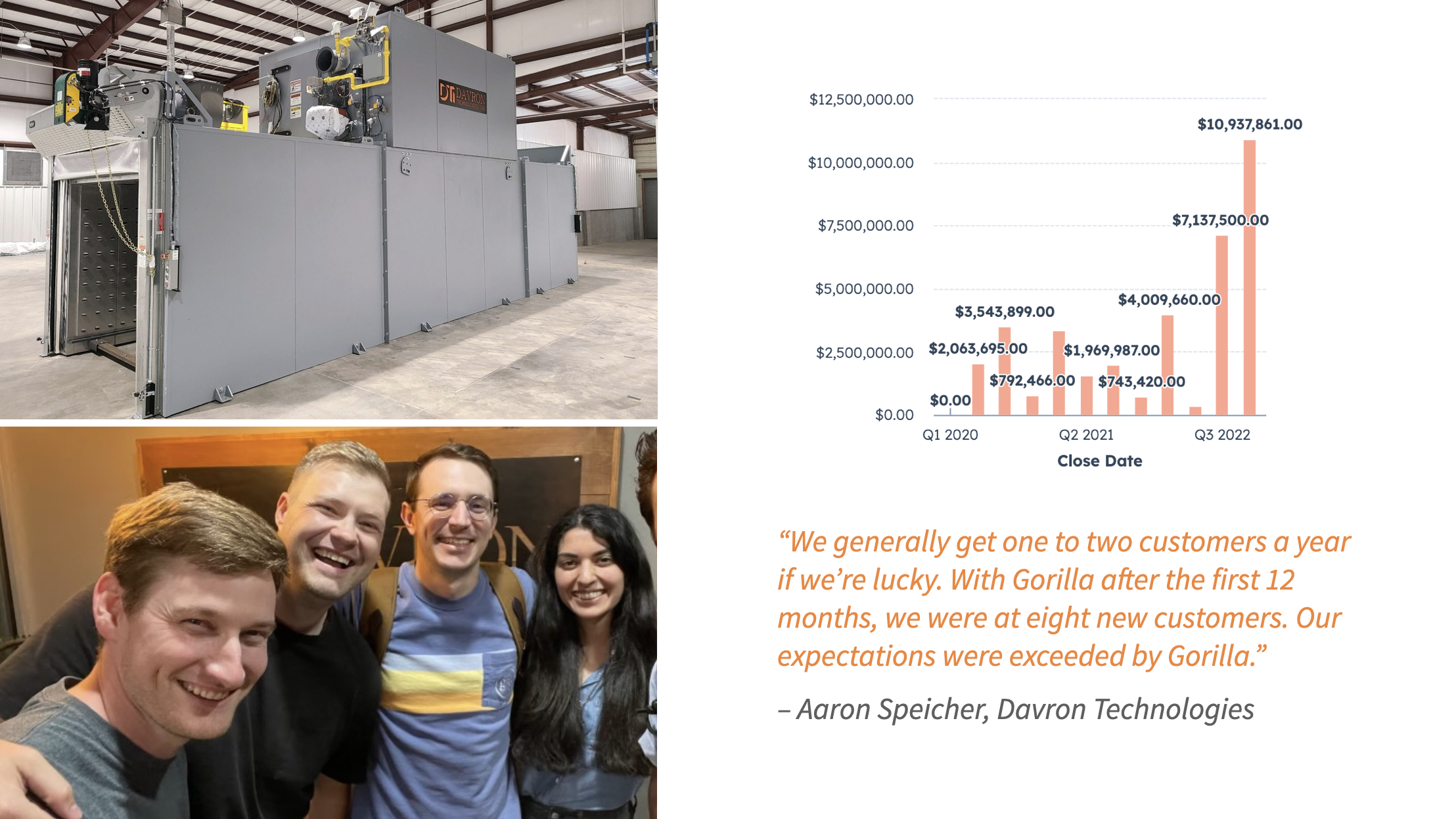
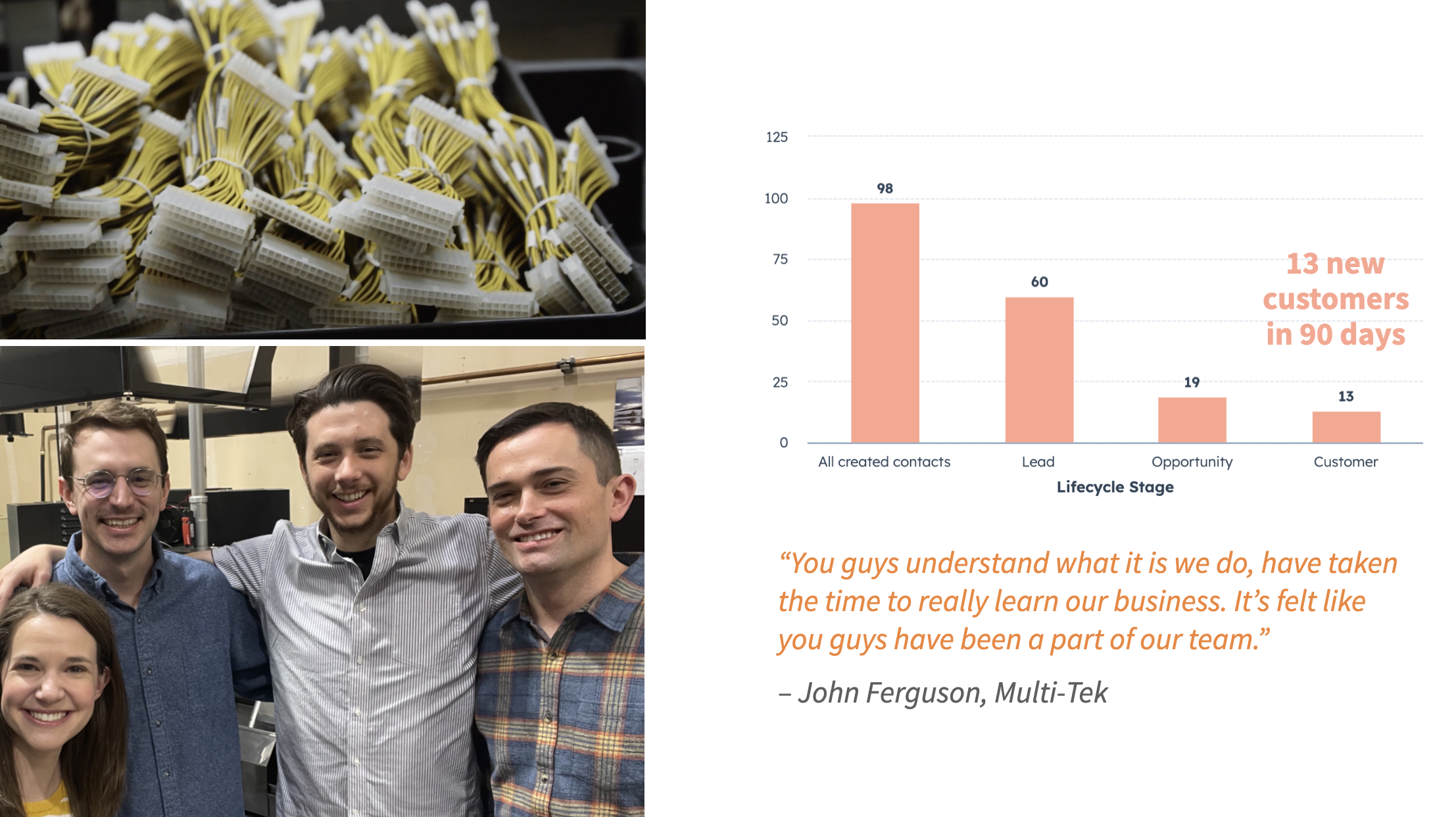

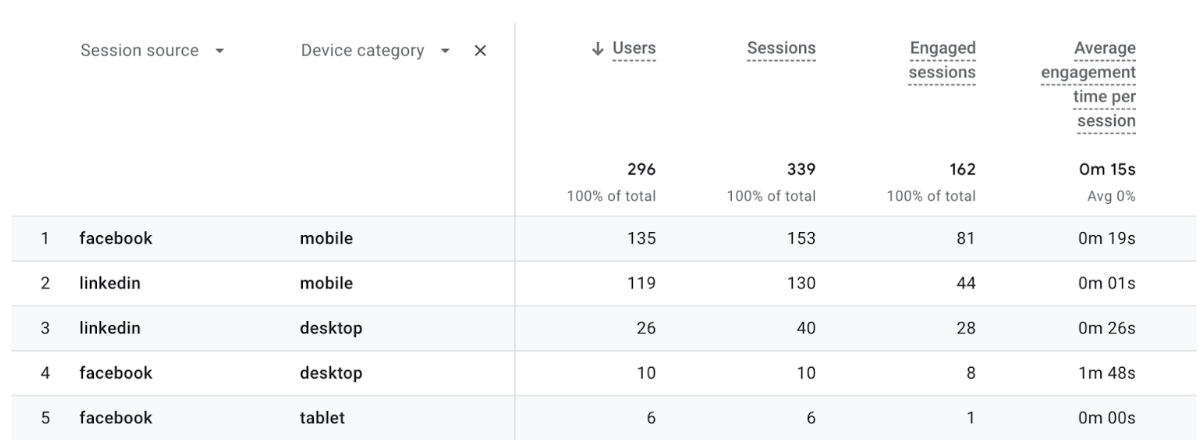
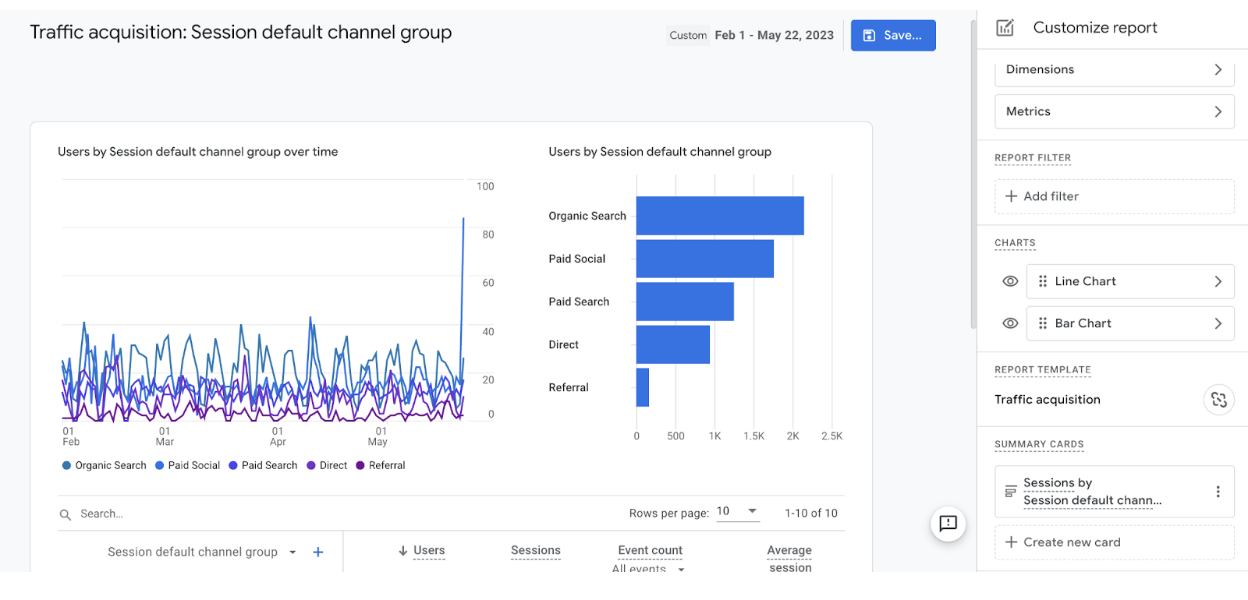






















 There’s been a steady increase in our existing customer business, as well as getting enough qualified leads from Gorilla’s marketing efforts that I haven’t really had to spend a lot of time prospecting or looking for new business.” – John Ferguson












 Loading, Please Wait


