
To get recommended in AI search, a manufacturing website has to say exactly what you sell, to whom and why, on pages an AI crawler can reach and quote. This guide walks the eleven steps we use to get a site there: positioning, audit, sitemap, URL decisions, expert content, technical checks, launch QA, off-site fixes and measurement. Note that many of these steps can be tackled independently — and not part of a major website project — but the easiest way to explain how to optimize your website is by talking it through, start to finish.
Manufacturers that want to refresh a website usually have one of three reasons pushing them:
-
It’s just time. Maybe you just haven’t touched your site in any meaningful way since 2004.
-
You need to turn around a performance slide. Maybe you were winning traditional Google search with thin, keyword-stuffed content — and every Google update has taken a bite out of your rankings and traffic. Qualified leads have taken a dive down and to the right. And your brand is nowhere to be found in AI search.
-
You’ve got a positioning and messaging problem. Even your best customers don’t know the full scope and scale of what you do, and your current site doesn’t even come close to bridging that gap.
How much value your current site brings decides how careful you need to be with your transformation project.
If your website is bringing in a lot of qualified first conversations for your sales team, you need to be careful to preserve the rankings and content that’s responsible for bringing them in.
If there’s little value to your current website (here’s looking at those in camp No. 1!), you’d be best served by scrapping what you have and considering what type of people you wish your website attracted, and what you wish your website communicated about your products, services and differentiators, and starting fresh around those goals.
But regardless of the state of your current site, we’ve found that manufacturers generally want three things out of their new site:
-
Clearly communicate what you sell, who you sell it to — and why anyone should buy from you instead of the other guys who sell the “same” thing.
-
Have your content and brand name appear when your target audience searches — in Google, ChatGPT or wherever else — for the things you sell.
-
Look crisp and professional for all your important stakeholders. Future hires, potential investors and sales prospects alike.
We’ll walk you through how you get your site from point A (wherever that might be for your company) to point B (high-performing business tool) based on our experience having led website transformations for scores of manufacturers over the years.
Let’s dive in.
Where do you even start with a website transformation project?
There are two ways you can start your website transformation journey:
-
Zoomed in: Analyze every URL and technical element on your website to find what’s working and what’s not — and work your way backward toward a sitemap of what the new website needs to be.
-
Zoomed out: Start by asking yourself the big questions. Who is this website meant to attract? What, exactly, do you sell? What exactly makes your product or service better than everything else on the market? In what situations would someone actually be better served by purchasing a competitor product? Only once you have crystal-clear answers to the big questions, do you start auditing your website and asking yourself how valuable each URL is to attracting and persuading the type of person you most want to sell to.
You can easily get lost in the sauce of a website transformation project.
Approach No. 2 allows you to see the forest for the trees — and tie every micro-decision (Do we need to rework this page, or can it be left alone? What new content do we need to make?) back into the big-picture goals we know you have:
-
Getting your website and company name in front of more people who match the profile of your best customers when they’re searching (in Google or an AI chatbot) for what you sell.
-
Convincing them you’re the best option for their specific situation.
That’s why we recommend starting any major website project by getting really specific about what you sell, who you sell it to and what makes you different.
Two ways to start a website transformation
Approach No. 1: Zoomed in
Start at the crawl. Inspect every URL and technical element, then work backward to a sitemap.
Approach No. 2: Zoomed out
Start with who the site is for and what exactly you sell. Every later decision is made through that lens — allowing you to map out exactly about how to get from where you are to where you need to be.
Step 1: Get clear on what you sell, who it’s for and why they’d choose you
You can’t know which webpages you need to make, which pages you need to retire — or what headline to put on your homepage — until you’re crystal-clear on what you sell and who you sell it to.
Get your leaders in a room, and iron out clean, simple answers to these questions:
-
List everything you sell. Which of those products and services do you want to sell most? Which are lower priorities? Not everything can be front and center on your homepage.
-
What kinds of companies are you best equipped to help?
-
And what can you do for those companies that competitive alternatives can’t? What specific proof points do you have for these differentiators? “Quality products and exceptional customer service” is NOT specific enough, and is NOT something AI will think is a credible reason to recommend your product over your competitor’s.
-
In what situations would a potential customer actually be better served by using a competitor’s product or service? In AI search, if you can get crystal-clear and honest about when you aren’t the best fit, and are honest about that in your product breakdowns, AI is much more likely to recommend your product or service in the situations where you are the best fit.
Getting alignment on these questions is harder than it sounds. We typically find it requires a full positioning workshop with a company’s top leaders, where we allow healthy debate — but ultimately guide the group toward making tough decisions around priorities and true differentiators.
What we want to leave with is a shared set of answers to key questions that guide every downstream decision we make about the sitemap, content and design of your new site:
- Who, exactly, is our target customer?
- What, exactly, do they buy from us?
- What would they do if our product or service didn’t exist? Include both traditional competitors (e.g., Acme Corp’s competing product) and non-traditional competitors (e.g., doing nothing and living with a problem).
- What gap in the market/insight did you have that led you to design THIS product THIS way, given the competitive landscape?
- What differentiated capability does your product or service have that nothing else on the market does? How does that show up as true differentiated value for your customer? By way of example, say you have the best onboard GPU of all of your competitors’ vision systems. The value that would provide is the ability to store hundreds of thousands of images locally on the device to help with root cause analysis as a new production defect is discovered.
- How is your product or service priced in comparison with the competition? Are you the premium product (and what specifically justifies the premium)? Are you the budget product (and what specifically aren’t they getting at your price, and why is that okay in certain situations)?
- What type of situations or specific subsets of customers would benefit most from your product or service’s differentiated capabilities?
Through it all, we aim to get as specific as possible — allowing your new website to contain the true proof points it needs to give AI a compelling reason to recommend you above the competition in the exact buying scenarios you’d most like to win on.
| VAGUE | SPECIFIC |
|---|---|
| “We sell to midsized manufacturers.” | “We sell to custom machine shops averaging $1 to $3 million in revenue located within 150 miles of our service centers.” |
| “We have great customer service!” | “We have a 24/7 customer service line that is staffed by US-based representatives, allowing us to respond immediately to any production issue you might have. Just last week, one of our reps drove eight hours to Cedar Rapids, Iowa to make sure our customer didn’t have a minute more of downtime than they had to.” |
| “We offer precision machining.” | “We machine titanium and 17-4 stainless parts from 2 to 40 inches in diameter, hold ±0.0002 inches and run lots of 25 to 500. We don’t take aluminum production runs.” |
| “We’re competitively priced.” | “We quote 15 to 20% above the offshore alternative. That premium covers a first-article report in 10 days, engineering changes with no retooling charge and parts that never sit in a port because they never left Ohio.” |
| “We serve a wide range of industries.” | “We’re the right call for 50 to 5,000 unit runs where the design is still changing. Above 25,000 units of a frozen design, a high-volume stamping house will beat us on price and we’ll refer you to one.” |
Crystal-clear positioning gives you a great filter through which to audit your site in its current form:
-
“This page brings in a lot of traffic — but that’s because it ranks for keywords related to business we no longer want, and would turn away if it came through the door. It probably makes sense to retire this page and accept the drop in traffic (because it’s traffic that we don’t want that wastes our sales team’s time).”
-
“This page ranks for precision-machining related keywords — which is key to our company’s growth strategy. Let’s revamp this page with more specific proof-points to aid with AI recommendations, and make sure it’s properly linked to from other key pieces of content. Let’s preserve our traditional search rankings by maintaining the same URL.”
For a quick gut check on the clarity of your site’s current positioning, paste your homepage into an AI tool (e.g., ChatGPT, Claude, Gemini) with this prompt:
You are a positioning expert well-versed in "Positioning: The Battle for Your Mind" by Al Ries and Jack Trout and "Obviously Awesome" by April Dunford.

I'm going to link our company homepage below. Read this as someone who has never heard of our company.

Using only the copy on the homepage, explain what we sell, who it's for
and why that customer would choose us. List any claims that need proof.

If the copy doesn't answer a question, say so. Don't fill in the gaps or do additional research.

Homepage URL: [paste it here]
How big is the gap between what you know to be true about your company, and what AI thinks about you based on the copy on your page?
That is the gap we need to fill through better, clearer copy and a better defined site structure.
For a full breakdown of where positioning fits into your overall marketing efforts, read our guide to the 7 elements of an industrial marketing strategy.
Step 2: Make your company’s branding stand out from the competition
A website project is a good time to revisit the way your company looks, too.
Pull up your current homepage beside a product sheet and a sales presentation. Would someone recognize all three as coming from the same company? And does that company look like the one you described in your positioning work? Or does your brand look stuck in 1999?
You may need better photography and a consistent set of page layouts. You may need to rethink the whole visual identity. Give your designer enough context to make that recommendation before asking for a homepage mockup.
Then test the proposed design on the pages that have to do the hardest work. A dense specification table. A case study with technical drawings. A product family with several models to compare.
Can you read the table on a phone? Does the photography help explain what you make? Can a prospect find the next step without hunting through the navigation?
Our colleagues Allen Fennewald and Randall Zaitz’s article on consistent, distinct brand design is a useful starting point for that conversation. It covers the choices around typography, imagery and color that your team will need to apply across the site.
Especially in a time when AI flattens design and makes everyone look the same — investing in stellar branding work packaged in a way that can feed into any design automation (e.g., automated proposals created from your first sales conversation) is more important than ever to helping your company stand out from the pack.
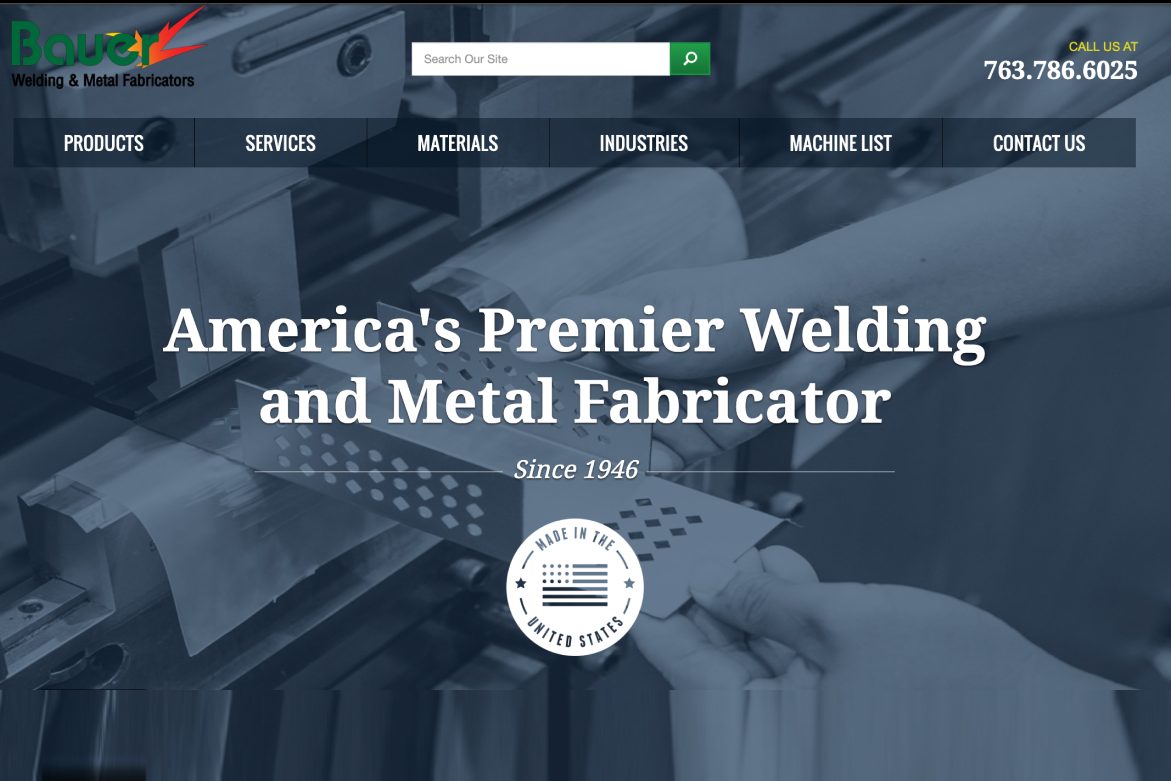
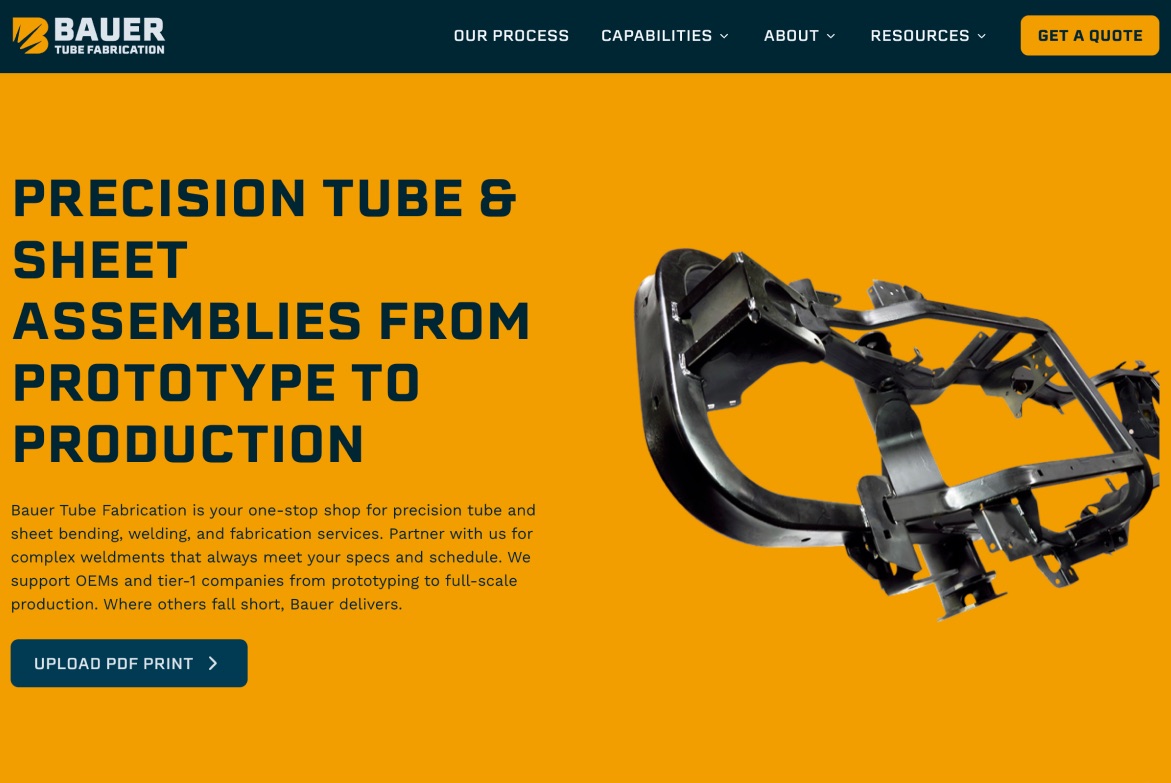
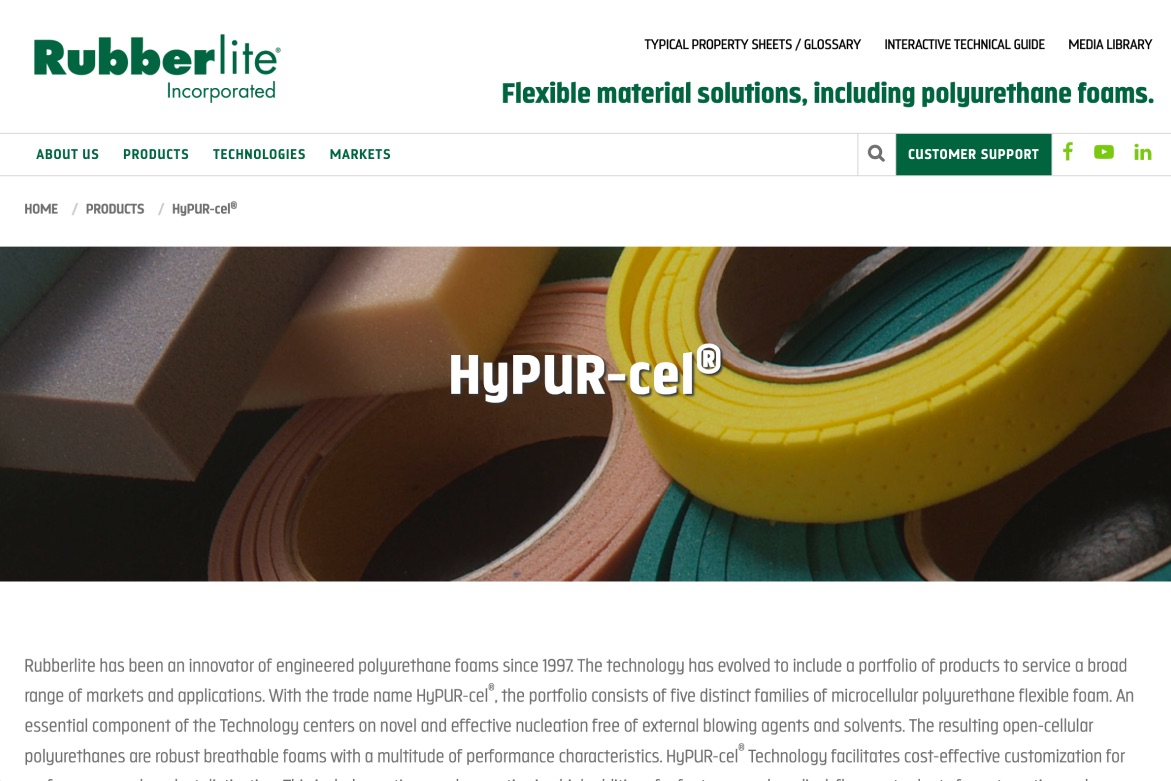
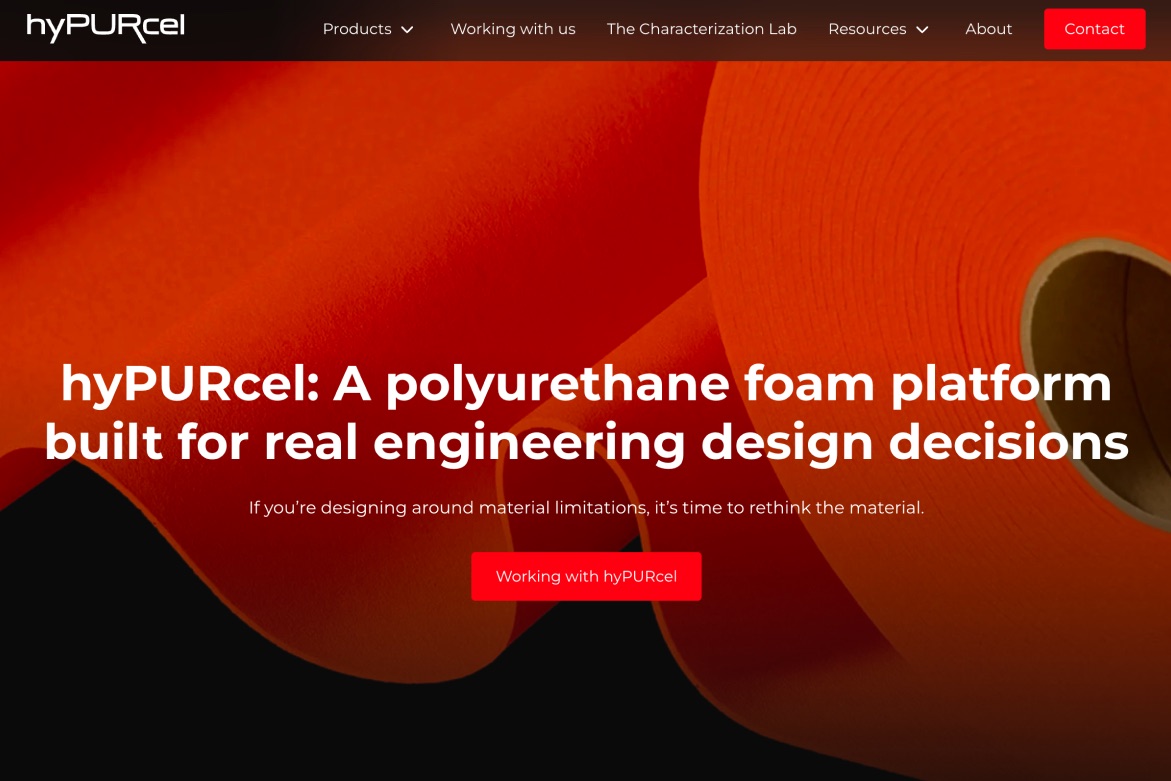
Before and after: two manufacturer website rebuilds
Bauer Tube Fabrication
hyPURcel (Rubberlite)
Step 3: Audit your website for AI search: what’s working, what’s broken and what’s quietly working against you
It’s finally time to get out your magnifying glass! You’re ready to fully audit your current site, technical issue by technical issue and URL by URL.
The answers from your positioning work let you tie every micro-decision back to company strategy.
Here’s what we do every time we run a site audit:
-
Crawl your website, URL by URL. Look at the current search performance of each URL (by looking at data from Google Search Console and Google Analytics). Which pages are ranking well in traditional search (and are these keywords that are important to you given your company strategy)? Evaluate the content. If it’s not performing well in search, why not? Is the content thin? Does the content match the intent of the query or topic? If it’s performing well, how could we update it to boost performance (freshness helps with both traditional and AI search)?
-
Test whether AI crawlers can actually access your website. We’ll typically request your homepage as each AI crawler (OAI-SearchBot and ChatGPT-User for ChatGPT, Claude-SearchBot and Claude-User for Claude, PerplexityBot for Perplexity) and record what comes back, because a firewall or CDN rule can block one specific bot while your robots.txt looks clean. This type of testing is easy to do with a crawling tool like Screaming Frog.
-
Do a comprehensive content audit of your most important pages (e.g., key product and service pages, important blog content). What pages contain a high percentage of “duplicate content” (content that exists on multiple pages)? Are specific proof points given for any claims (e.g., “ISO 9001 certified” rather than “Always the highest quality”)? Which pages comprehensively answer the intent of the query it was written for? Which are thin and warrant revisiting during your website transformation project?
-
Map out key facts about your company: your name, your founding year, key leaders, products, materials, certifications. Make sure those facts are listed consistently on your site, directories and third-party profiles.
-
Use real buyers’ words during sales calls to brainstorm the types of questions your prospects are likely asking ChatGPT, Claude, Perplexity, Copilot or Gemini during the sales process. Search them — and record whether your company was recommended or absent entirely. Where you’re absent, take a look at the competitor content that was cited. This is your map of content you need to create for your new website.
-
Map your architecture from the crawl: which pages have no internal links pointing at them, whether your important pages cluster around a pillar, where near-duplicates are splitting one topic across three URLs.
-
Assess your off-site footprint (referring domains, trade press, reviews, communities, the individuals at your company with a public presence) against the competitors AI names, not the ones you name.
You’ll leave this audit with a list of a-million-and-one things you could do. Technical fixes, pages to rework and blogs to write.
The hard part is synthesizing everything you find into one action plan that guides your entire website transformation — and fits within the timeframe and budget allotted for the project.
Using positioning, strategy and budget as the filter
The audit gives you everything you could do. Your job is to filter down to what you need to do.
At this point, I’ll typically go ahead and create a sitemap, as an exercise to organize my thinking about nice-to-haves and need-to-haves.
I’ll take the crawl of the website (usually from a tool like Screaming Frog) — and organize all existing pages by section and hierarchy.
I think Excel is the best way to map out a site plan — because it allows me to clearly leave notes about each page (the desired URL and any redirects required from the old URL, issues found during the audit, whether we should retire or rewrite the page with an explanation of why).
I find it’s helpful to separate actions into:
- The core website structure that needs to be live on day 1. Page rewrites, new pages, technical fixes that have to go live with the new website.
- Your overall content gap that will guide new page launches and new blog content long into the future.
Below is an illustrative example of how I represent that within the finished sitemap:
The sitemap is where the audit becomes a decision
A simplified view. The working sheet runs to dozens of rows and a dozen columns.
| Page | URL | Phase | Template | Owner | Notes | |
|---|---|---|---|---|---|---|
| 1 | Homepage | / | Day 1 | |||
| 2 | Capabilities | nav only, no page | Day 1 | |||
| 3 | CNC milling | /capabilities/cnc-milling | Day 1 | |||
| 4 | Swiss screw machining | /capabilities/swiss-screw-machining | Day 1 | |||
| 5 | Wire EDM | /capabilities/wire-edm | Later | |||
| 6 | Industries | nav only, no page | Day 1 | |||
| 7 | Medical device | /industries/medical-device | Day 1 | |||
| 8 | Semiconductor | /industries/semiconductor | Later | |||
| 9 | Quality & certifications | /quality | Day 1 | |||
| 10 | Learning center | /learning-center | Day 1 | |||
| 11 | Tolerance guide for medical parts | /learning-center/medical-tolerances | Day 1 | |||
| 12 | What AS9100 requires of a supplier | /learning-center/as9100-supplier-requirements | Later | |||
| 13 | Swiss machining vs. CNC turning | /learning-center/swiss-vs-cnc-turning | Later | |||
| ⋮ | 38 more rows | |||||
Once you have a rough sitemap put together, paired with notes about each page, you’re ready to go back through with a fine-toothed comb and make all the micro-decisions necessary to land on your core website sitemap for your website project. And leave the nice-to-have content as your map for the months to follow your site launch.
Step 4: Make a keep/rewrite/combine/retire decision about every URL
With your sitemap in front of you, decide what happens to each existing page: keep it, improve it, combine it with another page or retire it.
Keep the address of a page that’s working whenever you can. You can completely rewrite a page, improve its design and add technical detail without changing its URL.
If the subject and purpose of the page are staying the same, a cleaner-looking address usually isn’t a good enough reason to change the URL. Changing the URL can affect the ranking of that page in traditional search — sometimes temporarily and sometimes permanently — even when the migration is handled correctly. See Google’s site migration guidance to learn more.
Sometimes, it will make sense to combine pages. If two pages are competing for the same topic and term — you can improve your overall visibility for those queries by combining those pages into one, more comprehensive page.
For pages you’re considering combining, really dig into the intent of each page. Two articles can mention the same product and serve different needs: One helps a buyer select it, and the other helps an owner maintain it. Keep both if both have a job to do.
When two pages really do answer the same question, bring the useful material together at the strongest relevant URL, then permanently redirect the other addresses there. Update the internal links, too, so visitors go straight to the finished page. If you’re retiring a page with no relevant replacement, return a proper 404 or 410 status instead of redirecting everything to your homepage per Google’s migration guidance.
Keep, improve, combine or retire: a framework for how to decide what to do with each URL
Run every page on the current site through this before the new sitemap is final.
Scroll sideways to follow the full chart →
Step 5: Map out your site hierarchy and interlinking structure
You’ll want to clearly map out the site hierarchy and interlinking structure — so that the most important pages are merely a click away from the homepage, and so no page on the new site is “orphaned” (a page no other page links to, which makes it hard for crawlers to find).
Ask yourself:
- What should my main menu look like? What pages are most important to be immediately accessible from that menu?
- Which are the most important pages on my site? Perhaps specific products and services that are absolutely vital to your company’s growth strategy. Specifically plan the in-depth content you should make on each product and service — and how the product page will link to in-depth blog content, and vice versa.
Every page that makes the final sitemap should sit within three clicks of the homepage through internal links.
On a well-structured site, a machining capability page might link to material guidance, inspection documentation and a case study. Each of those pages should give a reader a relevant route back to the capability page or a way to discuss a job with your team.
Google and AI crawlers alike use links to discover pages and understand their relevance and relative importance. Its guidance recommends that every page you care about have a link from at least one other page on your site. For a deeper dive, check out Google’s internal linking guidance.
To get your wheels turning on your overall homepage menu and structure, here are a few sites we’ve worked on over the years:
- The Korte Company: A Design-Build general contractor website
- Davron Technologies, Inc.: An industrial oven manufacturer
- hyPURcel: A website for a polyurethane foam product
- Northwood Machine: A CNC machine manufacturer
Step 6: Use the content gap to decide what comes next
You identified a lot of content gaps during your site audit:
-
You searched questions real buyers ask in the sales process in tools like ChatGPT, Claude, Copilot and other chatbots — and made a list of when you appear and when you’re absent entirely. You took note of which competitors were getting recommended, and which specific pages and blogs on their site were getting cited in the answers.
-
You looked at the traditional search traffic and rankings for every current page on your site using Google Search Console and Google Analytics (along with perhaps tools including Ahrefs or Semrush) — and know which pages are performing, and which aren’t. Taking special consideration of those pages currently ranking 3-20, where an update to the content could make a meaningful difference in the search visibility of your brand.
-
You scored all your most important content on whether it comprehensively addresses the intent of the keyword or query it is targeted at.
You can generate even more content gap ideas using the prompt below with your favorite AI chatbot (ChatGPT, Claude, Copilot or anything else):
Help me find gaps in our manufacturing website's content.

Here is the URL: [Insert URL]

I'll provide our positioning, a page inventory with the copy or a
summary of each page and sales-call notes.

Extract the buyer questions from the notes. Preserve their wording
and identify the source for each one.

For each question, show:
- The existing page that answers it, if one does
- What that page still needs to explain or prove
- Whether to improve that page or consider a new one, and why
- The subject-matter expert or document we'd need before writing

Group questions that one useful page could answer together.
Keep any additional questions you suggest in a separate list
labeled "hypotheses to check with sales."
If you haven't been given a page's content, mark it "not reviewed."

Positioning: [paste or attach]
Page inventory and content: [paste or attach]
Sales-call notes: [paste or attach]
Log every content idea you can think of in your sitemap. New pages, new blog posts, rewrites. Add new pages in the section where they would fit best, and list all blog ideas you can under the learning center.
For pages you want to rework, specifically note what needs to change in the rewrite. For new pages, document the keyword or buyer question it needs to address (as well as where else on the site it needs to link to/from).
When you’re done with that, comb back through your sitemap line by line:
- Which pages absolutely have to be part of your site on the day it launches? For example, new product pages and rewrites that are absolutely vital to your company strategy, and to ensure you don’t lose any traffic and visibility value you already have.
- Which content types are missing entirely? AI rewards proof and comparisons. No case studies? Write a few for your top-priority products first, with the most specific before-and-after detail you can get. No “X vs. Y” pages? Your engineers can explain when they’d recommend each option, and those pages get quoted.`
- What’s your budget (timeline and resources) for this website project? You’re not going to be able to tackle everything, all at once. Which pages are “good enough” for now and can be revisited as part of your regular content strategy post-launch? Which pages matter most?
Then comb back through and mark each page as “Day 1” (meaning it has to be part of your initial launch) and “Later” meaning you will revisit and prioritize post-launch as part of your ongoing content and AI search strategy.
It’s not a bad thing to generate a thousand content ideas. In fact, it’s by doing so that you’ll allow yourself to leave no stone unturned, and zero in on the absolute top priorities for your website transformation.
Step 7: Write the content with the people who know the products best
Before you open Microsoft Word and start drafting a single page, sit down with your engineers, applications specialists and technical salespeople. Ask them what a buyer would need to understand to make a good decision.
For a capability page, I’d want to know:
- What information do you need before recommending this process?
- What materials, dimensions and tolerances can you work with, and under what conditions?
- What makes one job more expensive than another?
- When would you recommend a different process or supplier?
- What documentation can we publish to support those answers?
- What are a few examples of times you’ve successfully overcome common obstacles to deliver this service for real customers?
Keep going when you hear an answer like “it depends.” Depends on the material? The geometry? The order quantity? Those are the details the page needs — and that AI needs to recommend your product or service over another.
We dive deep on how to prepare for and conduct interviews with subject-matter experts in this article. Bring the questions and the existing page to the interview so your expert can react to something specific.
Pro tip: Only book each subject matter expert once. One interview with your top engineer can easily populate five or more pages — as long as you prepare for that interview with exactly the gaps in knowledge you need to fill.
Give your product and capability pages enough detail to help someone choose
Here’s a working checklist you can use with your team as you write and review product and service page copy. Adapt it to what you sell; a custom machining service and a catalog product will need different levels of detail.
| What the page needs to explain | What to collect before writing |
|---|---|
| What you make and who it’s for | Product or service name, intended applications and the situations where it’s a poor fit |
| Whether you can handle the job | Materials, dimensions, tolerances, quantities and the conditions attached to each limit |
| What affects cost and timing | Cost drivers, tooling requirements, order information and any lead-time range your team can substantiate |
| How you verify quality | Inspection methods, current certifications and the documentation a customer receives |
| Why a buyer should believe you | Test results, technical photographs or an approved case study with the starting problem and measured result |
| How to take the next step | What to include in a request for quote, where to send it and who handles application questions |
If you can’t publish a price, explain what goes into the quote. If a tolerance only applies to certain features or materials, say that beside the number.
But if you fail to provide the detail a buyer would be searching for in AI search (e.g., “Help me select the best generator for XYZ situation, include pricing implications of each recommendation”) because “it depends,” AI will just find another manufacturer that explained what it depends on.
For case studies, collect the starting condition, what changed, the result and how it was measured. Have the customer approve what you plan to share. If you can’t substantiate a result, keep it out of the copy.
Make the answers easy to find
Use headings that tell a reader what the section answers, then answer directly underneath. Put comparable specifications in a table. Keep the units and conditions close to the figures they qualify.
Microsoft specifically recommends clear headings, tables and evidence to help AI systems reference content accurately. Check out Bing’s content guidance to learn more.
Give the photographs a job, too. Show the feature you’re explaining, label the relevant detail and write useful alternative text. For a process video, publish a summary and transcript so someone can get the explanation without watching the whole thing. This also makes that information easier to access by an AI crawler.
Put the important specs directly on the page, even if you keep the PDF
Keep downloadable catalogs, drawings and spec sheets for the people who want to download them. But make sure to put the information someone needs to evaluate your product directly on the web page itself as well.
Publishing specifications in page text and tables is to make them available alongside the explanation, comparison and next step, all in one place — easy for ChatGPT to grab and compile in its recommendation to a searcher.
Have your technical reviewer compare the web copy against the current datasheet before either goes live. Assign an owner to keep both current when a specification changes.
Revisit your priority articles when the advice or supporting evidence changes, too. Update the substance and show an accurate revision date. Substantively refreshing your most important content on a regular basis can help boost your visibility in both Google and AI search platforms.
Use AI to organize the interview, then check it against the source
Once you’ve interviewed the expert, try this before asking an AI tool to draft:
Turn this interview into source notes for our [product/capability] page.

Extract the specifications, application advice, tradeoffs and proof
points. For each, include the speaker, exact supporting passage and
timestamp or source location where available.

Preserve units, ranges, exceptions and uncertainty. Flag contradictions.
Separate confirmed facts from opinions and questions needing follow-up.
Don't add specifications, customer results or advice from outside
the interview. Leave missing information blank.

Then list the follow-up questions we need answered before drafting.

Interview: [paste or attach an approved transcript]
Have the expert review the finished copy, especially anything involving performance limits or product selection. Name the author on articles and credit technical reviewers for the work they actually did.
Step 8: Make sure search engines and AI tools can read the finished site
Give your developer a short list of representative pages to test: the homepage, an important product or capability page, an article and a technical resource. Repeat the checks across the site before launch.
Check the crawlers that support search
Your robots.txt file, hosting rules and firewall all need to permit the access you intend. A successful test with a crawler’s name is useful, but your developer should also check verified bot requests in server logs. Changing the user-agent name alone doesn’t reproduce a request from the bot’s actual network.
For ChatGPT, these user agents have different jobs:
| User agent | Job |
|---|---|
| OAI-SearchBot | Finds pages for ChatGPT search |
| GPTBot | Crawls content that may be used for model training |
| ChatGPT-User | Visits pages for certain user-initiated actions |
You can allow OAI-SearchBot while blocking GPTBot. OpenAI documents those controls separately and publishes IP ranges your developer can use to verify requests. Check out OpenAI’s crawler documentation for more information.
For Perplexity search, check PerplexityBot and the firewall guidance in Perplexity’s crawler documentation. Have your developer review Googlebot and Bingbot access as part of the ordinary search checks, too.
In Google Search Console, check Settings → Search generative AI and confirm the site is included. Google documents this separately from ordinary search inclusion. See Google’s Search generative AI control documentation to learn more.
Check what the server sends before scripts run
When an AI browses your site, it reads the tree structure of everything on the page: what your browser builds out of your HTML before it draws a thing on screen. A person sees the rendered front end. The AI never does.
That structure is called the DOM, or document object model. Chris Coyier’s explanation of the DOM from 2013 still holds up.
This is why JavaScript causes trouble for crawlers. If a script assembles part of your page in the visitor’s browser, a crawler that doesn’t run JavaScript never sees what the script put there.
Ask your developer to inspect the initial HTML, the page content returned by your server. Can they find the product name, explanation and specifications there?
Google can render JavaScript, but its documentation notes that some other search engines can’t. Putting your important content in the initial HTML reduces reliance on that extra step. You can read Google’s JavaScript SEO guidance to learn more.
You can still use tabs and accordions. Check that the content is present and readable without requiring a click to fetch it.
An accessible website is a crawlable website. The DOM is also what a screen reader uses to read a page aloud to someone who can’t see it. So the work of meeting the WCAG accessibility guidelines is mostly the same work that makes a page easy for a crawler to parse: clean, semantic HTML, real heading levels, buttons and links that say what they do, meaningful alt text.
Aim for an accessible site and you’ll get a crawlable one along with it.
It runs the other direction, too. Something can be invisible to a human in the browser and perfectly visible to an AI, because it’s still sitting there in the DOM.
Randall Zaitz, our Digital Creative Director, runs accessibility audits with AI. In nearly every audit, it turns up duplicate buttons and other elements that aren’t on the visible page at all.
Use structured data that matches what’s on the page
Structured data is code that labels information about your company and content. Your developer might use Organization for company details, Product for products, Service for services and BlogPosting for articles.
The labels need to describe the real page. Don’t invent prices, reviews or ratings to fill a field in a plugin. Google’s structured data guidelines require markup to reflect the content a visitor can see.
Google also says there’s no special schema required for its AI features. Treat this as part of maintaining an accurate website. Check out Google’s AI search guidance to learn more.
Step 9: Thoroughly review your site, including testing forms
Before you go live, have your team check:
- Priority pages can be indexed, with no leftover staging blocks or unintended “noindex” settings
- Canonical tags identify the intended main URL for each page
- Redirects lead to the correct replacement pages, and internal links use the final URLs
- The XML sitemap lists the live URLs you want indexed
- Product information is readable on mobile and the pages load without getting in the way
- Quote requests, file uploads and contact forms reach the right person and are recorded in your CRM
And always, always test the forms yourself — including checking what happens after you hit submit. Are any automated confirmation emails firing off as expected? Is the information routing correctly to your CRM?
I once tested the primary request-a-quote form, and discovered that the Gravity Form wasn’t routing appropriately to the HubSpot CRM. I was able to quickly rework the Gravity Form integration prior to launch, ensuring no precious leads were lost post-launch.
Step 10: Map out your post-launch AI search strategy
You just spent a long time — probably weeks or months! — carefully curating what exists on your site. But AI chatbots weight what’s off your site just as much or more.
Go back and test all the buyer questions you tested in ChatGPT, Copilot and Claude. Look at the third-party resources being cited in the answers:
- Directories
- Industry trade journals
- Listicles and roundups
- Distributor websites
Look at how your products, capabilities and company are described in these resources. Also take note of which lists and resources never talk about your company at all.
Start with the errors that could change a buying decision: a discontinued product, an old service area, the wrong certification or a distributor’s datasheet that no longer matches yours.
For a listing your team controls, update it. For a distributor page, send the corrected information and ask for the change. For an industry article, contact the publisher with the specific correction and a supporting source.
Then think about where your experts could contribute something useful: an application article for a trade publication, a technical presentation or a customer-approved project story.
Off-site authority signals — including consistency of company information, third-party recommendations and proof points, valuable mentions and links from trusted sites — influence traditional and AI search alike.
You can get more ideas on how to holistically drive AI search visibility by reading our comprehensive guide for manufacturers.
Step 11: Measure whether the website is bringing you more of the right conversations
Keep the baseline from your audit and record what you changed, on which pages and when. Then watch your search performance, AI answers and qualified inquiries together.
Here’s what to put in the reporting plan:
| What you want to know | Where to look |
|---|---|
| Are the pages we protected still attracting relevant search traffic? | Google Search Console’s search performance data, alongside landing-page activity in Google Analytics |
| Are our links appearing in Google’s AI answers? | Search Console’s Generative AI performance report, which reports impressions for AI Overviews and AI Mode and lets you review pages |
| Which pages are being cited on Microsoft’s AI surfaces? | Set up a Microsoft Clarity project on your website, and track citations over time |
| Are AI tools recommending us for the buying situations we care about? | Repeat the questions from your audit and save the full answers, dates, tools and sources. You can do this manually or through a purpose-built tool like Peec AI. |
| Are we attracting prospects our sales team wants to talk to? | Qualified inquiries, associated opportunities and sales feedback in your CRM |
Tools such as Peec AI can help you get a daily snapshot of your AI search visibility on dozens of prompts taken directly from the words of your best prospects — and continually feed your content strategy by identifying all gaps preventing you from being recommended in ChatGPT, Copilot, Perplexity and Claude.
And ask people how they found you. Add a free-text field to your inquiry form and bring the question into the first sales conversation. If someone mentions ChatGPT, have your sales team ask what specifically they searched during the first sales call.
Use those answers to inform your next round of content ideas. They can reveal an application you haven’t explained or a comparison your sales team needs to address.
We give a comprehensive overview of how we measure progress and success in AI search on this page.
How long does it take to see a change?
In the immediate weeks after launching a new site, expect to see fluctuations in traditional Google search rankings and traffic — as your new pages get indexed and Google/AI search measure your new content up against what already exists on the internet.
That said, we’ve seen AI cite new content we’ve published mere days after going live. The trick is just making sure your content actually addresses a real need or question — and is better than anything else that exists on the internet.
If you followed the steps outlined in this guide, you’ll have done careful planning to ensure you’re protecting the value your site already has — and merely building on top of it to fill in the gaps about what exactly you sell, what exactly makes you different and why exactly an AI chatbot should recommend you over the other guys.
Google’s own guidance on site moves puts a rough clock on it. For a small to medium-sized website, it can take a few weeks for most pages to move over in Google’s index, and larger sites take longer. Google also says visibility in search may fluctuate temporarily during the move, calls that normal and expects rankings to settle down over time.
One more piece of housekeeping: Keep your redirects in place for at least a year. Check out Google’s site move documentation to learn more.
Where AI fits, and where it doesn’t
AI has transformed what it’s like to knock through a major website project.
Here’s exactly where we use AI at Gorilla 76 on a website project, and where we don’t.
Where we use it:
-
Auditing your website. We painstakingly refined a purpose-built skill (a scripted set of instructions our AI tools run; we’re currently on version 53 of that skill as we continue to refine it) that runs the audit in Step 3: It crawls the site, tests crawler access, checks your company facts across the web, runs your buyers’ questions through the AI tools and maps the architecture. What it hands back is a complete list of content gaps and ideas — with a level of thoroughness that would take at least a full week to do manually. A human reviews every recommendation, throws out what doesn’t fit your positioning and adds the ideas only someone who knows your business would see.
-
Researching, outlining and drafting content. A second set of skills maps who already answers each buyer question and where the gaps are, then writes out the exact questions we need your expert to answer to make the piece better than anything else on the internet. Once the expert has answered, the same tools outline and draft against those answers and the sources we hand them. Every claim carries its source, and a person checks it before you see a word.
-
Building the site. We develop on a headless CMS, which lets us take the approved branding and the finished content and cut the time (and the cost) between “the copy, branding and sitemap are done” and “the site is live.” The bigger payoffs show up years after launch:
- Your content is stored as fields, not pages of HTML. A spec is a spec, a certification is a certification. That makes it far easier to govern, update in one place and reuse.
- You write it once and publish it anywhere. The same product spec can feed the website, a customer portal, a dealer app or a store without anyone re-entering it.
- Design and content come apart. Your developers can rebuild or redesign the front end without touching or migrating a single page of content.
- It grows with you. A new microsite, subdomain or product line doesn’t mean standing up another CMS instance.
- There’s less to attack. No public-facing admin login and no plugin sprawl to patch, which is a common headache with something like WordPress.
The prompts earlier in this guide are small, do-it-yourself versions of those same moves.
Where we don’t use AI:
-
Making the important calls. Which pages to keep, which to retire, what you sell first, what your brand should say about you. Those are judgment calls, and human beings need to make and own them. AI gives us options and speed. People make the final call.
-
Publishing anything unreviewed. If something goes out under our name or yours, a person is responsible for the content within. Everything is written, edited and fact-checked before it ships.
-
Standing in for your experts. AI can’t interview your engineer, and it doesn’t know what your engineer knows. Real people still run the interviews, and your expert still reviews the technical claims.
Give your team a manageable first assignment: one important capability page, the source documents behind it and an interview with the person who knows it best. Work through the research, writing and technical review before applying the process to the rest of the site.
If you’re considering an agency, ask to see how it gets from source material to finished copy:
- Who interviews your engineers? Where do those conversations get stored so you don’t have to ask the same question twice?
- Who checks the specifications?
- How does the team decide which existing pages to preserve?
- What will you measure after launch?
The right agency should have compelling answers to all of those questions — and have a few example sites they can walk you through that match the complexity of your products and services.
A few questions you may still have
Is optimizing for AI search different from SEO?
Yes, but the work overlaps substantially. Google says its AI features build on its existing search systems and SEO fundamentals. You still need useful content and pages search engines can access; monitoring AI answers adds a different view of whether that work is helping. Our AI search guide for manufacturers explains how the answers are assembled differently in traditional and AI search.
Do we need an llms.txt file?
Google says it ignores llms.txt for search visibility, including its AI features. While we always recommend making one anyway, we’d prioritize it below the content and access work in this guide. A file that a particular tool can read isn’t a requirement for appearing across AI search.
Do we need a whole new website?
Only if your current site prevents you from doing the work you need. If you can improve the content, fix access and make the pages easier to use in your current system, start there. A rebuild should solve a specific limitation in the structure, design and performance — or bring your branding up to current standards and expectations so you stand out in the market.
How much should we budget, and what comes first?
Price the actual work in your sitemap: technical repairs, page rewrites, new content, brand design and development.
If the budget is tight, fix anything preventing access or inquiries, protect the pages already bringing good prospects and improve the pages for the products you most want to sell. Give the post-launch content list its own budget and schedule.
You can always address more or fewer of the issues identified in your site audit to scale your budget or timeline up or down.
Need some help sorting through all of this?
If you’d like help with an upcoming website project, book a strategy call with Gorilla 76. Bring your current site, the products you most want to grow and whatever you know about the pages that already bring you good customers.
We’ll have a much more useful conversation with those in front of us.


